¶ Purpose
The Physical Stock Entry for Warehouse screen allows users to add the actual physical count details of a material available in a particular warehouse.
¶ Prerequisites
The following tasks must be completed before the Physical Stock Entry for Warehouse transaction.
- Prepare the physical stock data according to the IcSoft template .
- Upload the stock information using the provided Excel template.
- After completing the upload, generate the Physical to System Variation Report in IcSoft.
- Ensure that the item rate reflects the last Goods Receipt Note (GRN) rate (new rate).
- The rates in the table should be updated based on either the weighted average (Wt Avg) rate or the First In, First Out (FIFO) rate:
- Weighted Average (Wt Avg): Update using the current weighted average rate report.
- FIFO: Use the last GRN rate for the corresponding warehouse.
- Verify the report to ensure that:
- The total physical stock matches the total in the report.
- The system stock corresponds to the values in the SystemLive column.
- Confirm that the new rate is correctly reflected as either the weighted average rate or the FIFO rate.
- Review and confirm the variation with the customer or user.
- Confirm and match the date.
- The Batch Number must be checked in the system stock, and not in Physical stock.
- The Characteristics must be checked in the system stock.
- Access rights must be assigned to the responsible user for Physical Stock Entry for Warehouse transactions.
¶ Physical Stock Entry for Warehouse
The Physical Stock Entry for Warehouse screen allows the user to enter the physical quantity details of a particular item available in the specified warehouse.
Navigation: Main - Menu → Transactions → Inventory → Inventory Entries → Inventory → Show List → Stock → Physical Stock Entry for Warehouse

- The user must select the appropriate Warehouse from the dropdown list.
- The user can edit Stock Date, if required.
- The user must select the Item from the dropdown list.
- The user can search for the Item using F3 Key. Press F3, the material list will appear as shown below.

- The user must select the appropriate material.
- Click Refresh, the material details such as Item Name, Process No., Next Process No., PD, Process, System Stock, Characteristics Values, GRN Rate as per Bin Report, Rate, Value, Alloy, Last GRN Rate, Last GRN No., Last GRN Type, Update Status, Running Wt. Avg, Batch No. and the Chassis Number will appear.
- The user must enter details of the Physical Stock quantity.
- The user can enter Comments.
- The user can enter Update Status (Remarks).
- Click Save, the following message will appear.

- Click OK.
¶ Excel Import
The Import link allows the user to update the physical stock details for a particular material using Excel.

- Click Import link, the following screen will appear.

- The user must select the appropriate Excel.
- The user must enter details, such as Sheet Name, Start Row and End Row.
- The user must enter details of the Excel Position for each Field Name, which is the same as the name of the Excel column.
- Click Save Settings, the following message will appear.

- Click OK.
- Click Import, the Imported Successfully message will appear.
¶ View or Print Details
The Preview option allows the user to view and print the transaction details.

- The user must select the Warehouse and Item from the drop-down list. Click Refresh.
- Click Preview, the following screen will appear.

- The ITSPL Report Viewer screen allows the user to print all selected documents one after another.
- Click Print, to print documents.
- The user can view details in Excel, HTML, XML, Open Office, PDF and Notepad format if required.
- Click Email, the following screen will appear.
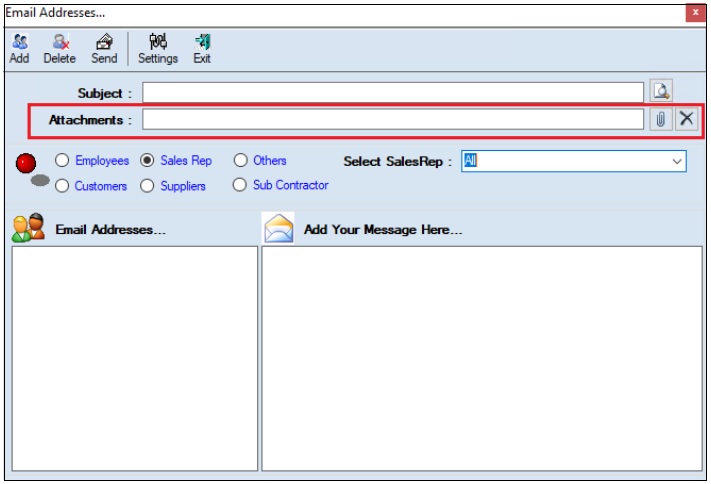
- The user must enter the Subject.
- The user can upload multiple attachments if required.
- The user can delete the uploaded attachments if required.
- The user must select one of the options from Employees, Customers, Sales Rep, Suppliers, Subcontractors or Others.
- Once the user selects the appropriate option, the corresponding Email IDs will appear in the Email Address section.
- The Add Your Message Here section allows the user to add messages.
- Click Send, to send emails.
- Click Add, to add the new email address.
- Click Delete, to remove the selected mail ids.
- Click Settings, the following screen will appear.
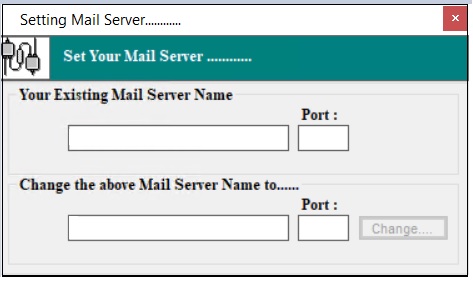
- The user must enter details of the Your Existing Mail Server Name, Port (Existing), Change the above Mail Server Name To and Port (New).
- Click Change.
¶ Functional Use Case
| SL No. | Use Case | Business Scenario | Functional Outcome in ERP |
|---|---|---|---|
| 1 | Physical Stock Entry for Warehouse | Users need to record and validate the actual physical stock available in a particular warehouse by comparing with system stock and rates. | Enables users to accurately record the physical quantity of materials in the warehouse, verify system variation, and update stock rates in ERP accordingly. |
¶ Use Case Scenario
- Click here for a detailed use case scenario.
¶ Transaction Checklist
| Steps | Checklist Item | Details / Purpose |
|---|---|---|
| 1 | Prepare stock data in the IcSoft template | Ensure stock count data is collected and formatted correctly. |
| 2 | Upload Excel template | Use the provided template to upload multiple physical stock entries. |
| 3 | Generate Physical to System Variation Report | Identify mismatches between physical and system stock for corrective action. |
| 4 | Verify item rate | Confirm rate reflects the last GRN rate (new rate). |
| 5 | Update rate as per method | Use Weighted Average or FIFO rate as applicable. |
| 6 | Match system and physical stock quantities | Ensure total physical stock matches report totals. |
| 7 | Validate SystemLive column values | Confirm system stock values align with ERP. |
| 8 | Cross-check new rate with valuation method | Verify the new rate as per the Weighted Average or FIFO logic. |
| 9 | Review stock variation with customer/user | Ensure transparency and confirmation of stock differences. |
| 10 | Match and confirm the stock entry date | Ensure transaction date consistency for traceability. |
| 11 | Validate the Batch Number from the system stock | The batch number must exist in the system, not in physical entry. |
| 12 | Check item characteristics in the system stock | Confirm characteristics exist in system before entry. |
| 13 | Enter physical stock details in ERP manually | Input stock data directly via the ERP screen for selected warehouse and material. |
| 14 | Enter Comments and Update Status | Provide relevant remarks for audit and future reference. |
| 15 | Save and confirm the transaction | Completes the entry and updates ERP with physical stock data. |
| 16 | Optional: Use Excel Import | Import stock entries in bulk with field mapping (Sheet Name, Start/End Row, Excel Positions). |